← WiQ – Where is Qibla

WiQ – Where is Qibla

أين القبلة

La direction de la Qibla et les horaires de prière, partout, même sans réseau.

WiQ – Where is Qibla indique la direction de La Mecque et les horaires des prières là où vous êtes. Elle vous rappelle les prières, vous accompagne le vendredi et pendant le Ramadan, compte votre tasbih et vous propose chaque jour un verset du Coran.

L'app est sobre et presque sans texte : des icônes, des heures et des distances. Chaque libellé est écrit en arabe, en or, avec sa traduction en dessous, dans la langue du téléphone. Elle existe en sept langues : arabe, français, anglais, espagnol, allemand, italien et néerlandais. Sur un téléphone en arabe, elle n'affiche que l'arabe.
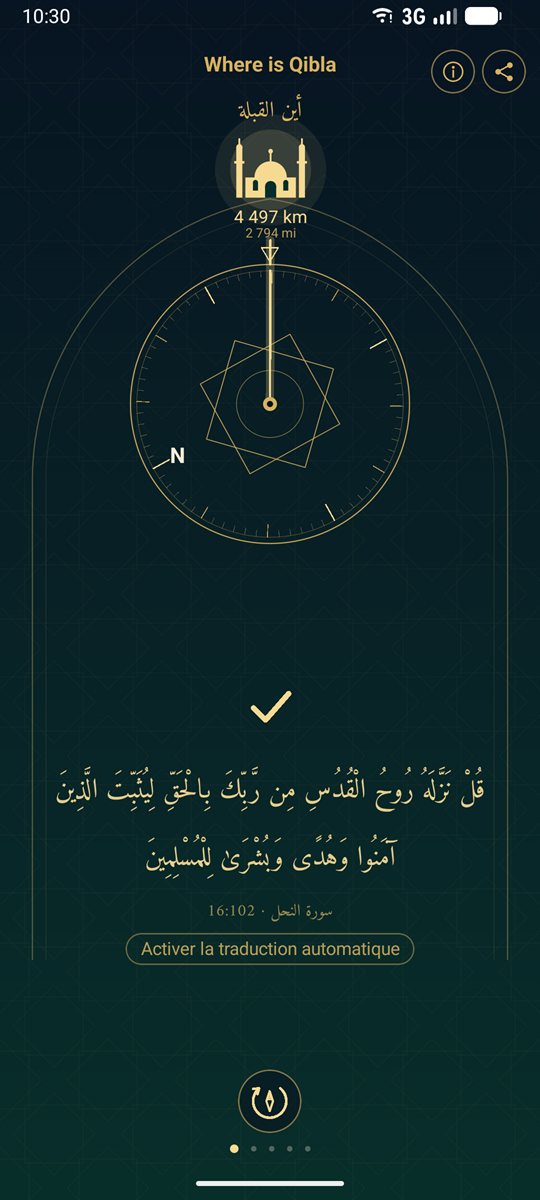
  • La page Qibla : la boussole, la direction de La Mecque et le verset du jour
    La Qibla et le verset du jour
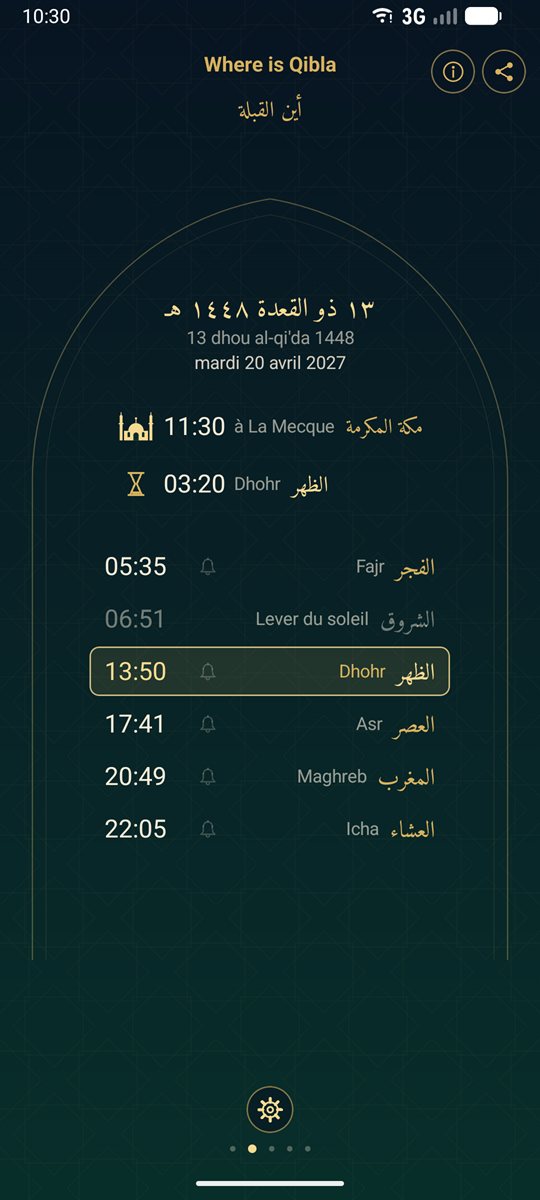
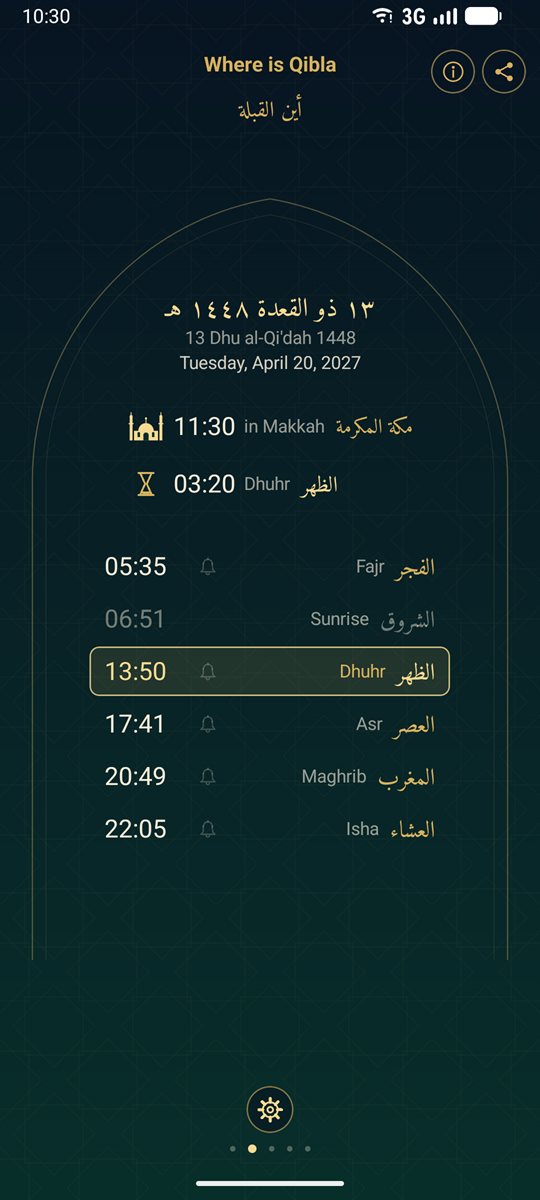
  • La page des prières : date de l'hégire, heure de La Mecque et horaires du jour
    Les horaires de prière
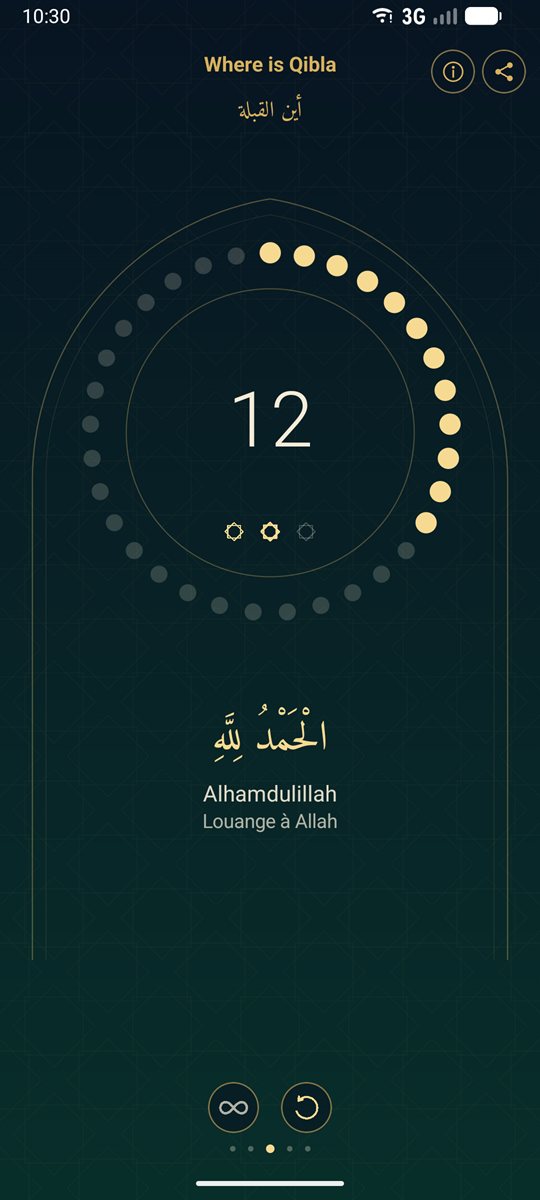
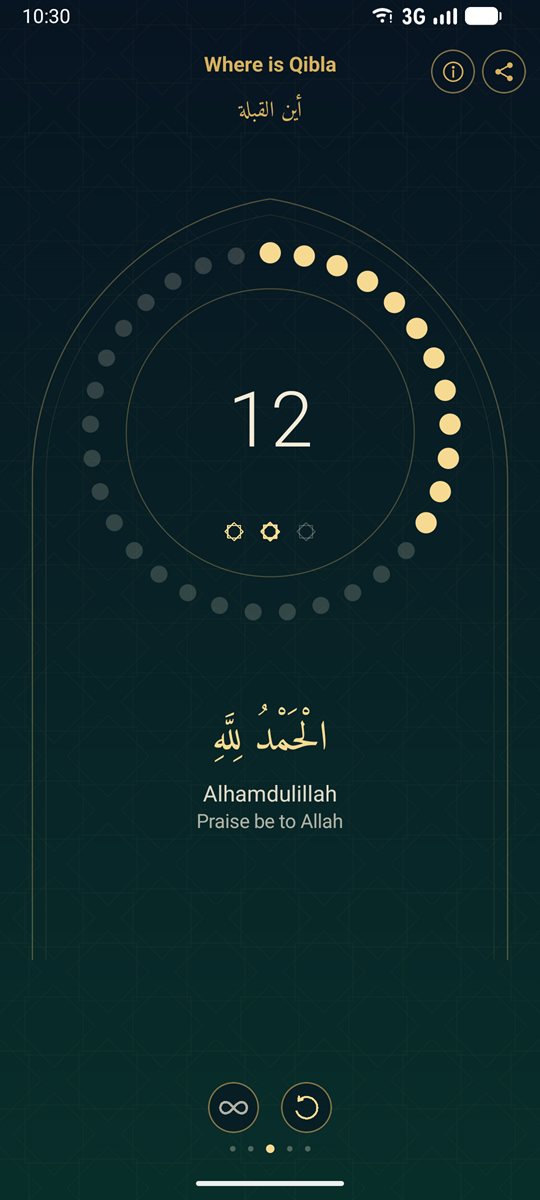
  • La page du tasbih : les grains et la formule en cours
    Le tasbih
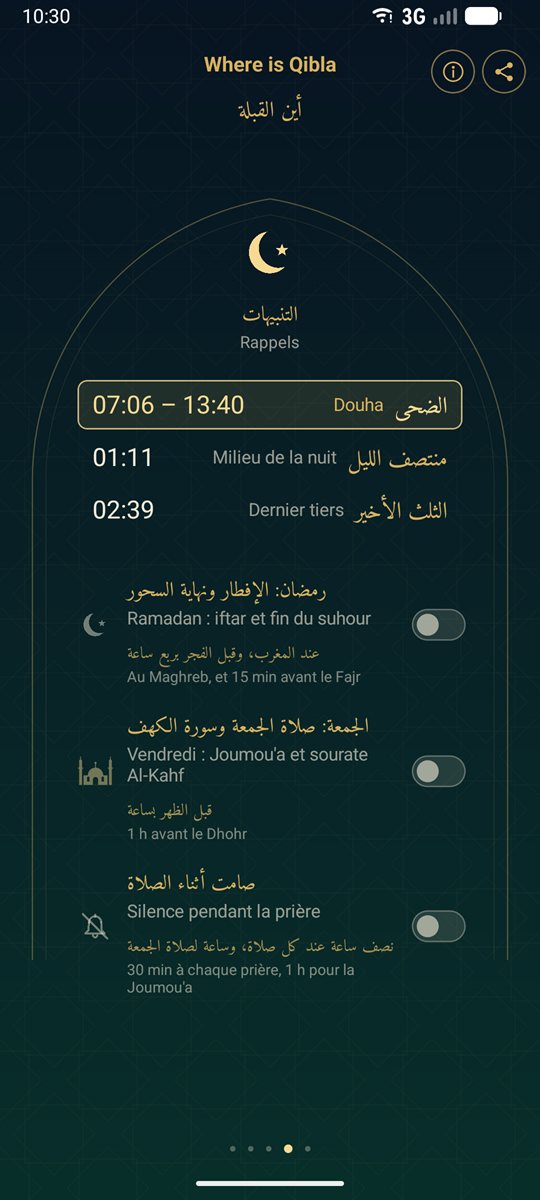
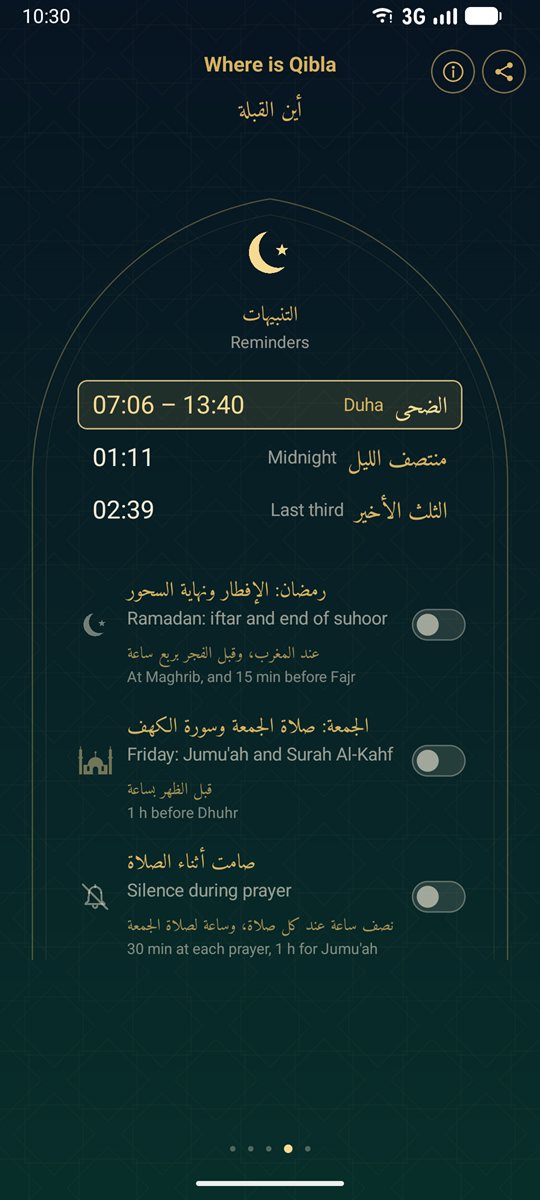
  • La page de la nuit et des rappels
    La nuit et les rappels
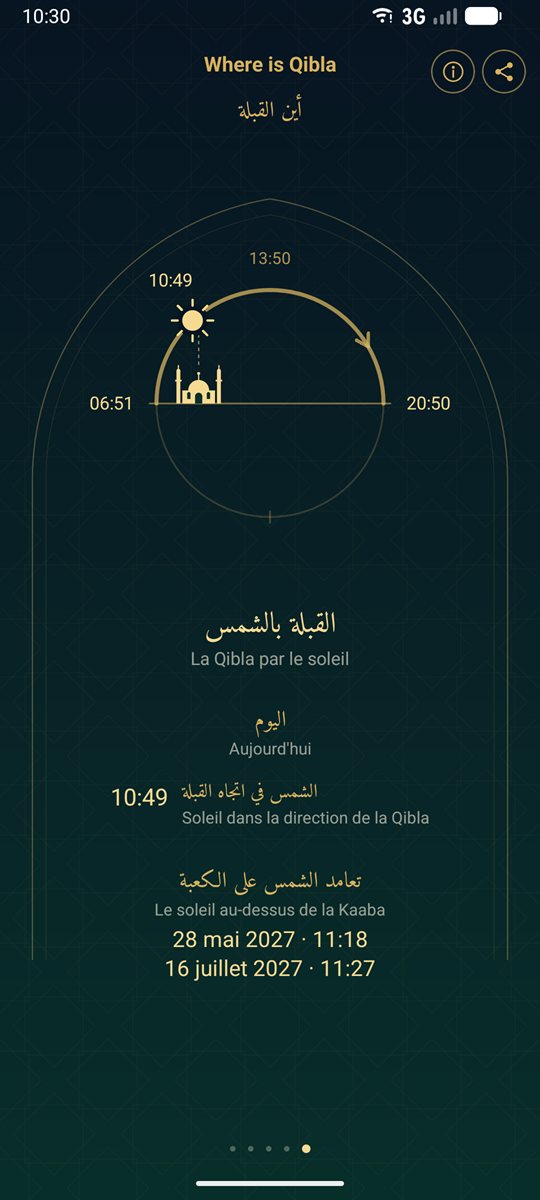
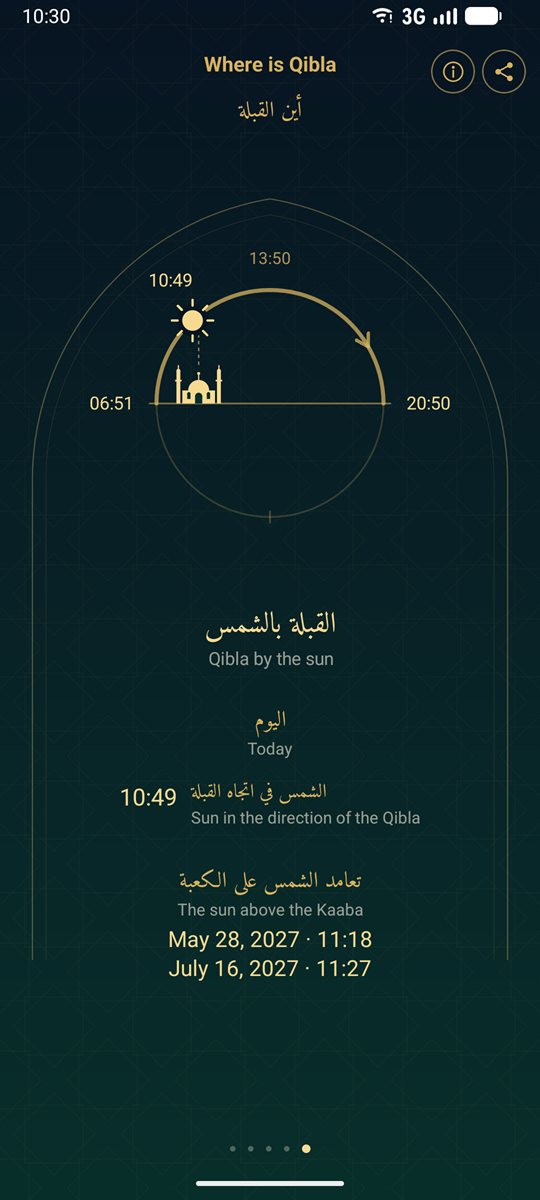
  • La page « La Qibla par le soleil » : le cadran du jour
    La Qibla par le soleil

Cinq pages

On passe d'une page à l'autre en faisant glisser le doigt ; après la cinquième, on revient à la première.

  • La QiblaUne boussole indique la direction de La Mecque, avec la distance en kilomètres et en miles. Une flèche montre de combien de degrés tourner ; quand le téléphone vise la Qibla, une coche apparaît et il vibre une seconde. Le verset du jour s'affiche sous la boussole. Si la boussole du téléphone est déréglée, le bouton de calibration, en bas, devient orange et montre les gestes à faire.
  • Les prièresLa date de l'hégire, l'heure de La Mecque, puis les six horaires du jour : Fajr, lever du soleil, Dhohr, Asr, Maghreb et Icha. La prochaine prière est en or, avec le temps restant. Le vendredi, le Dhohr devient la Joumou'a. Pendant le Ramadan s'ajoutent le jour du Ramadan et le temps restant avant l'iftar ou la fin du suhour.
  • Le tasbihTrois séries de 33 : Subhan Allah, Alhamdulillah, Allahu akbar, puis la formule qui complète la centaine. Chaque formule s'affiche avec sa transcription et son sens. Un compteur libre compte sans limite et garde son total.
  • La nuit et les rappelsLe moment de la prière de Douha, le milieu de la nuit et le début de son dernier tiers, comptés du Maghreb au Fajr suivant. En dessous, les rappels du Ramadan et du vendredi, et le silence pendant la prière.
  • La Qibla par le soleilUn cadran du jour montre le lever, le midi solaire et le coucher du soleil, et sa place du moment. La page donne les heures où le soleil est dans la direction de la Qibla, ou à l'opposé, quand votre ombre l'indique, et les dates où il passe au-dessus de la Kaaba ou à l'opposé.

Des horaires accordés à votre mosquée

Les horaires sont calculés sur le téléphone, à partir de votre position. La méthode de calcul est choisie d'office selon le lieu, et vous pouvez en choisir une autre parmi quinze : Ligue islamique mondiale ; Amérique du Nord (ISNA) ; Égypte ; Umm al-Qura (La Mecque) ; Karachi ; Dubaï ; Koweït ; Qatar ; Singapour, Malaisie, Indonésie ; Turquie (Diyanet) ; France (UOIF) ; Téhéran ; Maroc ; Algérie ; Tunisie.

L'heure de l'Asr suit l'avis standard ou hanafite, à votre choix. « Ajuster selon ma mosquée » avance ou retarde chaque prière de quelques minutes, pour suivre les horaires affichés à la mosquée.

Touchez la date de l'hégire pour voir les grandes dates à venir : début du Ramadan, Aïd al-Fitr, jour d'Arafat, Aïd al-Adha et Achoura. Elles suivent le calendrier Umm al-Qura : l'annonce locale peut différer d'un jour.

Les rappels

  • Rappels de prièreTouchez la cloche d'une prière : une notification discrète vous prévient à son heure.
  • Ramadan : iftar et fin du suhourAu Maghreb, et 15 min avant le Fajr.
  • Vendredi : Joumou'a et sourate Al-Kahf1 h avant le Dhohr.
  • Silence pendant la prière30 min à chaque prière, 1 h pour la Joumou'a : le téléphone passe en « Ne pas déranger », ou en vibreur seulement si vous ne lui en donnez pas l'accès.

Les rappels fonctionnent même quand l'app est fermée, et reprennent après un redémarrage du téléphone.

Trois widgets

  • Prochaine prière 2 × 1Le nom de la prochaine prière, son heure et le temps restant.
  • Heure de La Mecque 2 × 1L'heure qu'il est à La Mecque.
  • Qibla et prières 4 × 2La date de l'hégire, un cadran tourné vers le nord avec une flèche vers La Mecque, la prochaine prière et le temps restant, l'heure de La Mecque, le prochain passage du soleil dans l'axe de la Qibla et les cinq horaires du jour.

Toucher un widget ouvre l'app sur la page de la Qibla.

Le verset du jour

Chaque jour, un verset parmi 365, sous la boussole. Le texte arabe est celui du Tanzil Project (tanzil.net), sans aucune modification. En anglais, il est accompagné de la traduction de Pickthall. En français, en espagnol, en allemand, en italien et en néerlandais, une traduction automatique faite depuis l'arabe s'affiche si vous la demandez, avec la mention « Traduction automatique ».

Vos données restent sur votre téléphone

L'app n'accède pas à Internet : votre position, vos réglages et votre tasbih ne quittent jamais votre téléphone. Seul l'achat passe par Google Play, qui gère le paiement. Il n'y a ni compte à créer, ni statistiques, ni publicité. Le détail est dans la politique de confidentialité.

Entièrement hors ligne

Qibla, horaires de prière, rappels et versets fonctionnent partout, même sans réseau : en voyage, à l'étranger, en mode avion.

Sans publicité, sans abonnement

Le téléchargement est gratuit, et l'essai gratuit dure 10 jours, avec toutes les fonctions. Ensuite, un seul paiement, valable à vie, sur tous les téléphones de votre compte Google. Son prix est affiché dans Google Play avant que vous le confirmiez. Le détail est dans les conditions d'utilisation.

WiQ – Where is Qibla a été conçue dans le respect de la prière et de la vie privée des croyants : rien ne s'interpose entre vous et votre prière.
WiQ – Where is Qibla

أين القبلة

The Qibla direction and prayer times, everywhere, even without a network.

WiQ – Where is Qibla shows the direction of Makkah and the prayer times wherever you are. It reminds you of the prayers, accompanies you on Fridays and during Ramadan, counts your tasbih and offers you a verse of the Quran every day.

The app is sober and almost free of text: icons, times and distances. Every label is written in Arabic, in gold, with its translation below in your phone's language. It is available in seven languages: Arabic, French, English, Spanish, German, Italian and Dutch. On a phone set to Arabic, it shows Arabic only.

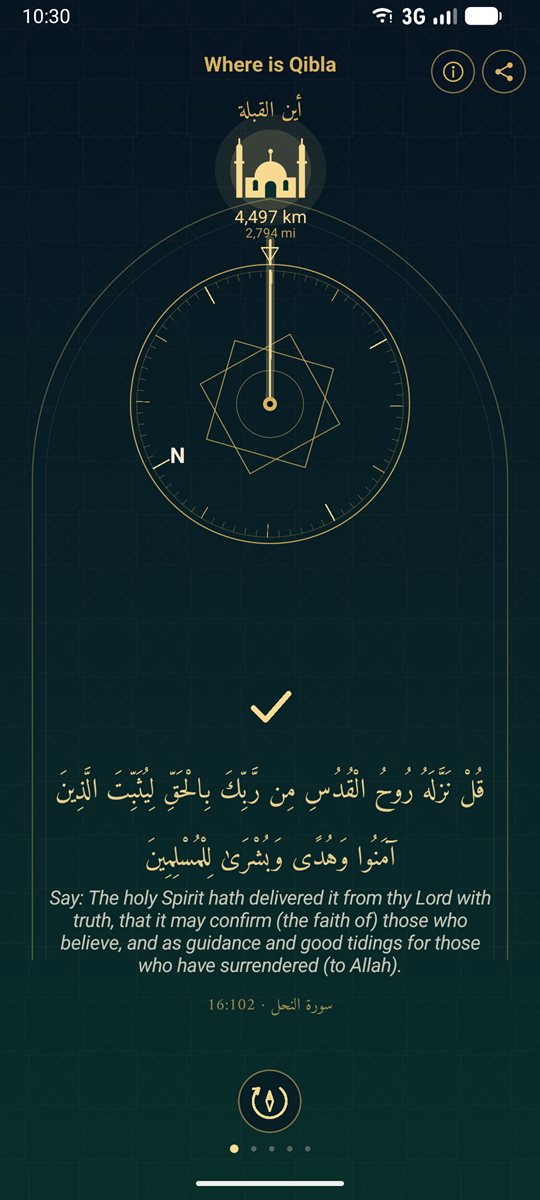
  • The Qibla page: the compass, the direction of Makkah and the verse of the day
    The Qibla and the verse of the day
  • The prayers page: Hijri date, time in Makkah and the day's prayer times
    Prayer times
  • The tasbih page: the beads and the current formula
    Tasbih
  • The night and reminders page
    Night and reminders
  • The Qibla by the sun page: the day dial
    Qibla by the sun

Five pages

Swipe to go from one page to the next; after the fifth, you come back to the first.

  • QiblaA compass shows the direction of Makkah, with the distance in kilometres and miles. An arrow shows how many degrees to turn; when the phone points to the Qibla, a check mark appears and the phone vibrates for one second. The verse of the day appears under the compass. If the phone's compass needs calibrating, the calibration button at the bottom turns orange and shows the gestures to make.
  • PrayersThe Hijri date, the time in Makkah, then the day's six times: Fajr, Sunrise, Dhuhr, Asr, Maghrib and Isha. The next prayer is in gold, with the time remaining. On Fridays, Dhuhr becomes Jumu'ah. During Ramadan, the day of Ramadan and the time left until iftar or the end of suhoor are added.
  • TasbihThree series of 33: Subhan Allah, Alhamdulillah, Allahu akbar, then the formula that completes the hundred. Each formula is shown with its transliteration and meaning. A free counter counts without limit and keeps its total.
  • Night and remindersThe time for the Duha prayer, the middle of the night and the start of its last third, counted from Maghrib to the next Fajr. Below them, the Ramadan and Friday reminders, and silence during prayer.
  • Qibla by the sunA day dial shows sunrise, solar noon and sunset, and where the sun is now. The page gives the times when the sun is in the direction of the Qibla, or opposite it, when your shadow points to it, and the dates when the sun passes above the Kaaba or opposite it.

Prayer times that match your mosque

The times are calculated on the phone from your location. The calculation method is chosen automatically for the place, and you can pick another among fifteen: Muslim World League; North America (ISNA); Egypt; Umm al-Qura (Makkah); Karachi; Dubai; Kuwait; Qatar; Singapore, Malaysia, Indonesia; Turkey (Diyanet); France (UOIF); Tehran; Morocco; Algeria; Tunisia.

Asr time follows the standard or the Hanafi opinion, as you choose. "Adjust to my mosque" moves each prayer a few minutes earlier or later, to match the times posted at your mosque.

Tap the Hijri date to see the major dates ahead: start of Ramadan, Eid al-Fitr, Day of Arafah, Eid al-Adha and Ashura. They follow the Umm al-Qura calendar: the local announcement may differ by one day.

Reminders

  • Prayer remindersTap a prayer's bell: a discreet notification lets you know when it is time.
  • Ramadan: iftar and end of suhoorAt Maghrib, and 15 min before Fajr.
  • Friday: Jumu'ah and Surah Al-Kahf1 h before Dhuhr.
  • Silence during prayer30 min at each prayer, 1 h for Jumu'ah: the phone switches to Do Not Disturb, or to vibrate only if you do not give it that access.

Reminders work even when the app is closed, and resume after the phone restarts.

Three widgets

  • Next prayer 2 × 1The name of the next prayer, its time and the time remaining.
  • Makkah time 2 × 1The current time in Makkah.
  • Qibla and prayers 4 × 2The Hijri date, a north-up dial with an arrow to Makkah, the next prayer and the time remaining, the time in Makkah, the sun's next passage in the Qibla direction and the day's five prayer times.

Tapping a widget opens the app on the Qibla page.

The verse of the day

Every day, one verse out of 365, under the compass. The Arabic text is that of the Tanzil Project (tanzil.net), unchanged. In English, it comes with Pickthall's translation. In French, Spanish, German, Italian and Dutch, a machine translation made from the Arabic is shown if you ask for it, labelled "Machine translation".

Your data stays on your phone

The app does not access the Internet: your location, your settings and your tasbih never leave your phone. Only the purchase goes through Google Play, which handles the payment. There is no account to create, no analytics and no advertising. Details are in the privacy policy.

Fully offline

Qibla, prayer times, reminders and verses work everywhere, even without a network: when travelling, abroad, in airplane mode.

No ads, no subscription

The download is free, and the free trial lasts 10 days, with all features. After that, a single payment, valid for life, on all the phones of your Google account. Its price is shown in Google Play before you confirm it. Details are in the terms of use.

WiQ – Where is Qibla was made with respect for prayer and for the privacy of believers: nothing stands between you and your prayer.